If you don’t fully understand permissions, you’ll:
- break apps
- expose your server
- get random “Permission denied” errors
Let’s fix that.
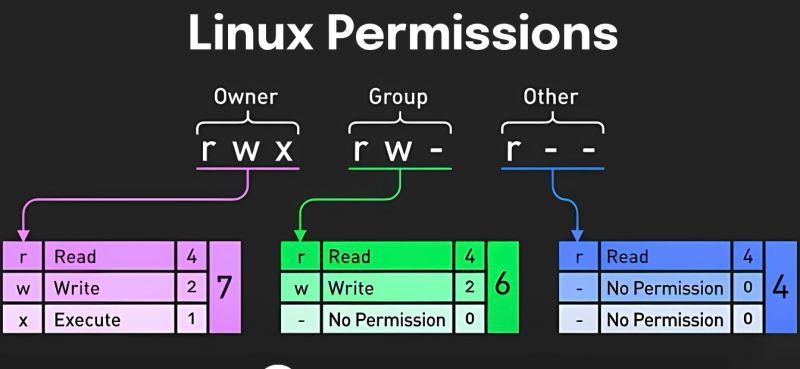
📂 Understanding Permissions
Example:
-rwxr-xr-- 1 user user file.shBreakdown:
r= readw= writex= execute
Groups:
- owner
- group
- others
🔢 Numeric Permissions
| Number | Meaning |
| 7 | rwx |
| 6 | rw- |
| 5 | r-x |
| 4 | r– |
Example:
chmod 755 file.sh👤 Change Ownership
chown user:group fileExample:
chown www-data:www-data /var/www/html⚠️ Common Mistakes
❌ Using:
chmod 777👉 This gives full access to everyone → security risk
🔥 Best Practices
- Web apps:
755 for folders
644 for files- SSH:
chmod 600 ~/.ssh/id_rsa🧠 Summary
Permissions are critical for both security and stability — master them early.