If you’re managing Linux servers, systemd is at the core of everything — services, boot, logs, scheduling.
Most people only know:
systemctl start nginxsystemctl start nginx
🔍 Check Service Status
systemctl status nginxShows:
- Logs
- PID
- Memory usage
- Errors
▶️ Start / Stop / Restart
systemctl start nginx
systemctl stop nginx
systemctl restart nginx
systemctl reload nginx
🔁 Enable Service at Boot
systemctl enable nginxDisable:
systemctl disable nginx🧩 Create Your Own Service
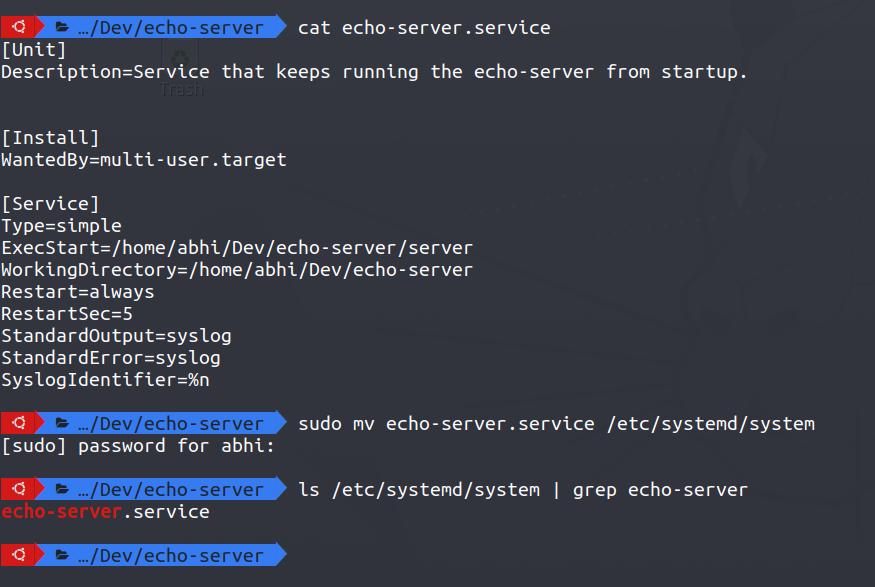
sudo nano /etc/systemd/system/myapp.service[Unit]
Description=My App
After=network.target
[Service]
ExecStart=/usr/bin/node /root/app.js
Restart=always
User=root
[Install]
WantedBy=multi-user.targetReload:
systemctl daemon-reexec
systemctl daemon-reload
systemctl enable myapp
systemctl start myapp
📜 Logs with journalctl
journalctl -u nginx
journalctl -f
journalctl --since "1 hour ago"
🔥 Pro Tips
- Use
Restart=alwaysfor critical apps - Combine with Docker or Node apps
- Debug boot issues with:
systemd-analyze blame🧠 Summary
Systemd is not just a service manager — it’s the backbone of Linux systems.