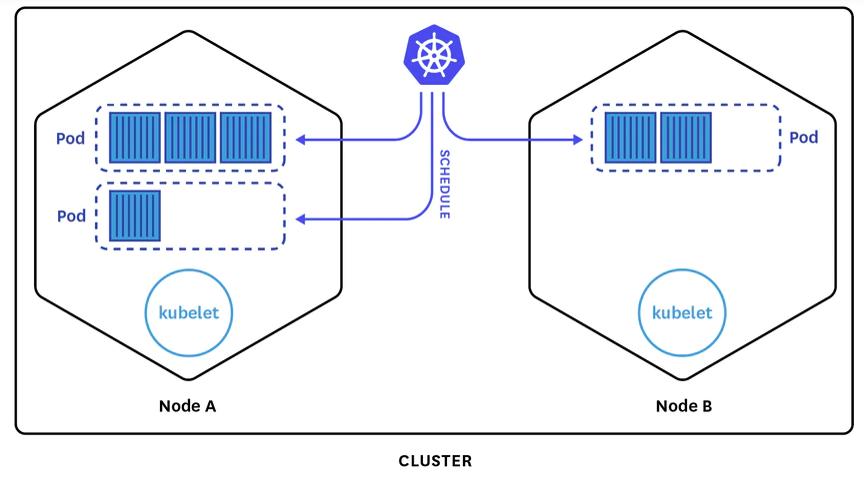
Kubernetes (K8s) is the backbone of modern infrastructure. It automates deployment, scaling, and management of containerized applications.
But let’s be honest — most tutorials overcomplicate it.
This guide gives you the minimum you need to actually start using Kubernetes today.
What is Kubernetes?
Kubernetes is a container orchestration system.
Instead of running containers manually, Kubernetes manages:
- Deployment
- Scaling
- Networking
- Failover
👉 Think of it as:
Docker + automation + clustering + self-healing
Core Concepts (You MUST understand these)
1. Pod
- Smallest unit in Kubernetes
- Runs 1 or more containers
2. Deployment
- Manages Pods
- Keeps them running
- Handles updates
3. Service
- Exposes your app to network
- Gives stable IP / DNS
Install Kubernetes (Fastest Way)
Use Minikube (local testing):
sudo apt update
sudo apt install -y curl
curl -LO https://storage.googleapis.com/minikube/releases/latest/minikube-linux-amd64
sudo install minikube-linux-amd64 /usr/local/bin/minikube

minikube start
Check:
kubectl get nodesYour First Deployment
Step 1 — Create deployment
kubectl create deployment nginx --image=nginxStep 2 — Expose it
kubectl expose deployment nginx --type=NodePort --port=80Step 3 — Access it
minikube service nginx🔥 Boom — your first Kubernetes app is live.
YAML Example (Real Way)
apiVersion: apps/v1
kind: Deployment
metadata:
  name: my-app
spec:
  replicas: 2
  selector:
    matchLabels:
      app: my-app
  template:
    metadata:
      labels:
        app: my-app
    spec:
      containers:
      - name: nginx
        image: nginx
        ports:
        - containerPort: 80
Apply:
kubectl apply -f deployment.yamlWhy Kubernetes Matters
- Auto-restarts failed apps
- Scales automatically
- Works across servers
- Cloud-native standard
Final Thoughts
Don’t try to learn everything.
Start with:
- Deployments
- Services
- Scaling
Everything else comes later.
👉 Kubernetes is hard at first — but once it clicks, it changes everything.